DESK & SENS :
deux plateformes complémentaires pour la surveillance de vos installations de stockage.
Les capteurs collectent des données. Les plateformes les transforment en décisions. Four Data vous propose deux interfaces logicielles conçues pour des usages distincts mais complémentaires : DESK, la plateforme professionnelle qui vous offre une vue d’ensemble complète de vos équipements, et SENS, l’application disponible sur mobile et via un navigateur Web, qui permet à vos clients finaux de surveiller leurs réservoirs en toute autonomie.
Ensemble, DESK et SENS couvrent l’ensemble de la chaîne : du contrôle opérationnel de centaines de capteurs à la consultation des niveaux des réservoirs depuis un smartphone. Vous gardez le contrôle, vos clients bénéficient d’une meilleure visibilité.
Une plateforme qui répond à tous vos besoins
Des plateformes intuitives pour la gestion de vos données
Les données collectées par les capteurs sont centralisées sur deux plateformes complémentaires : DESK, destinée aux professionnels, et SENS, destinée aux clients finaux.


Pourquoi « Four Data » ?
L’écosystème « Four Data » en chiffres
Deux plateformes conçues pour optimiser votre efficacité opérationnelle
Plateforme DESK
La plateforme professionnelle de gestion d’actifs.
DESK est le centre de commande de votre activité de télémétrie. Accessible depuis n’importe quel navigateur web, il regroupe tous les outils nécessaires pour surveiller votre parc de capteurs, gérer vos clients et optimiser vos opérations quotidiennes.
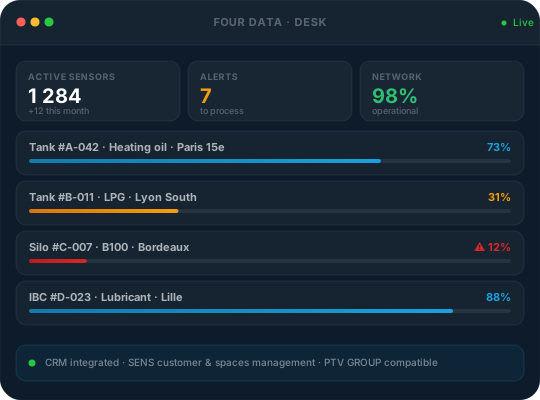
Tableau de bord centralisé
Un aperçu instantané de l’état de l’ensemble de votre parc en un seul coup d’œil : état des capteurs, passerelles actives, répéteurs et appareils nécessitant une intervention, le tout mis en évidence sur l’écran d’accueil.
Gestion multi-appareils
DESK prend en charge une grande variété de types d’équipements, au-delà des réservoirs de fioul. Gérez l’ensemble de votre parc mixte à partir d’une seule et même interface.
Système d’alerte intelligent
Trois types d’alertes vous tiennent informé de manière proactive : vous pouvez les appliquer à des actifs individuels ou les attribuer en masse à des catégories entières de réservoirs en un seul clic.
CRM intégré — Gestion SENS
Gérez tous vos clients et leurs comptes SENS directement depuis DESK, sans avoir à changer d’outil.
API et intégrations
DESK s’intègre parfaitement à votre écosystème existant grâce à des connecteurs performants et à des API ouvertes.
Suivi en temps réel
Offrez à vos clients une vue d’ensemble claire et actualisée de l’état de leurs équipements grâce à des widgets personnalisables : niveau actuel, tendances, historique et rapport de consommation.
Alertes personnalisées — 4 canaux
Les clients configurent eux-mêmes leurs alertes (seuils ou conditions de déclenchement) et disposent d’un contrôle total sur le canal et la fréquence : une seule fois, quotidiennement ou à chaque relevé.
Espaces et rôles multiples
Les clients peuvent passer d’un espace à l’autre en toute fluidité à partir d’un seul compte. Gestion fine des rôles et prise en charge des thèmes clair et foncé.
Module « marque blanche » et module de commande
Personnalisez SENS avec le logo de votre entreprise pour offrir une expérience client à l’image de votre marque, et automatisez les demandes de réapprovisionnement en fonction du niveau des réservoirs.
Comparaison
DESK vs SENS — deux interfaces, deux utilisations.
Découvrez en un coup d’œil ce que chaque plateforme a à offrir et laquelle convient le mieux à chaque profil.
DESK PRO vs SENS CLIENT
Comparaison complète des fonctionnalités| Rubrique | DESK PRO | SENS CLIENT |
|---|---|---|
| Public cible | Professionnels (distributeurs, opérateurs) | Utilisateurs finaux (particuliers, entreprises) |
| Assistance | Navigateur Web (ordinateur de bureau) | iOS, Android, navigateur Web (PWA) |
| Gestion multi-clients | CRM intégré, création d’espaces de travail | Gestion de plusieurs espaces de travail, navigation fluide |
| Accès à l'API | ✓ API complète + PTV GROUP | Non disponible |
| Types d'alertes | Seuil, variation, absence de variation, conditions multiples | Seuil, variation — 4 canaux : notification sur badge, notification push, SMS, e-mail |
| Configuration des capteurs | ✓ Gestion complète de la flotte | Consultation uniquement |
| Exportations | Excel · PNG · PDF | Non disponible |
| Marque blanche | ✓ Disponible | ✓ Logo personnalisé |
| Module de commande | ✓ Disponible | Disponible s'il est activé sur DESK |
Intégrations et écosystème
Compatible avec vos outils existants.
DESK s’intègre à vos logiciels ERP, GMAO et logistiques grâce à des API ouvertes et à des connecteurs natifs.
API REST
Récupérez toutes les données des capteurs par programmation. Intégrez la télémétrie en temps réel à vos propres tableaux de bord, à votre ERP ou à votre GMAO.
PTV GROUP
Intégration native avec PTV GROUP pour une planification intelligente des itinéraires en fonction des niveaux des réservoirs en temps réel — hiérarchisation automatique des livraisons.
ERP et GMAO
Connectez DESK à vos systèmes de gestion intégrée (ERP) ou de maintenance. Automatisez les flux d’informations et déclenchez des ordres de travail à partir des données des capteurs.
Foire aux questions